

About the game
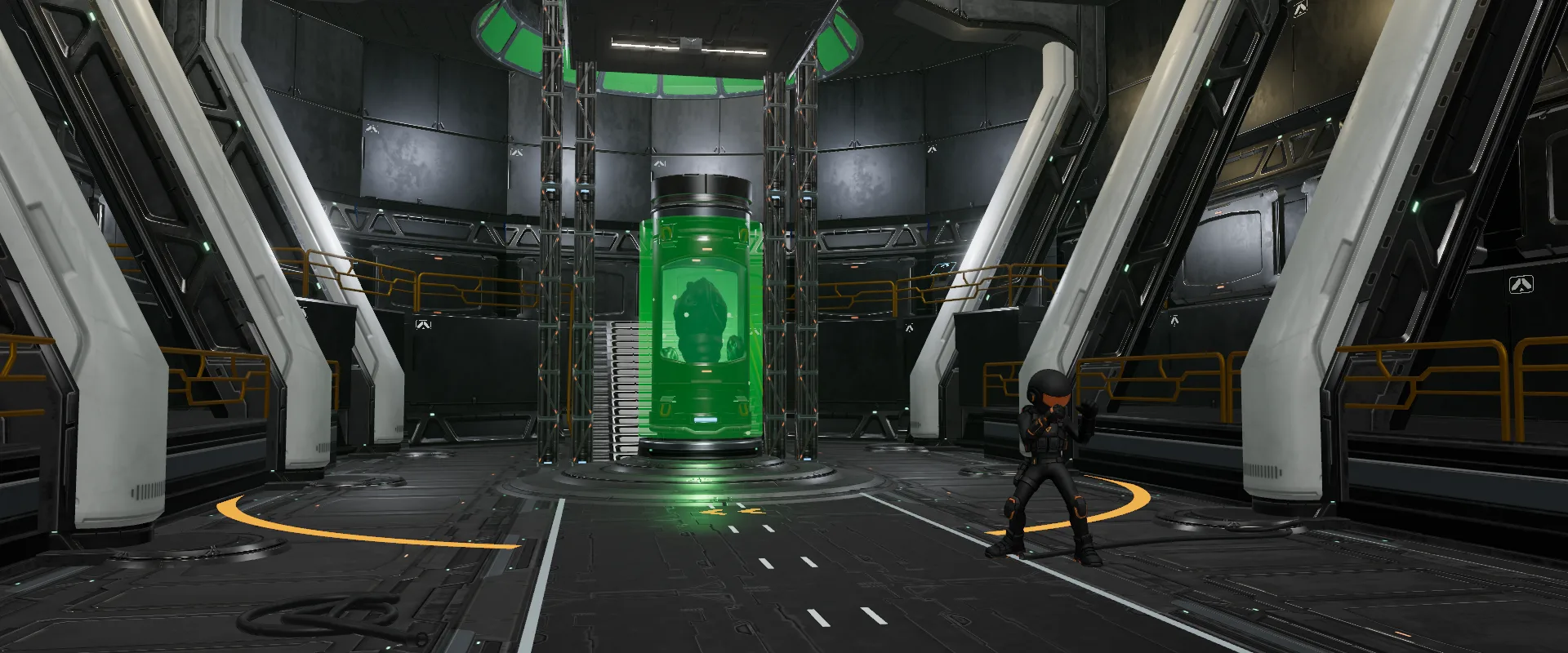
Orbital Station is a 3D exploration game that runs right in your browser, with nothing to install and no account required. You control a soldier in a black suit inside a space station: corridors with windows onto the stars, automatic doors that slide open with a soft pneumatic hiss, warning lights, steam rising from a floor grate and a faulty lamp flickering at a bend in the corridor. Each time you step into a new place, the name of the area shows up on screen.
The game starts in the access corridor with Mission 1: find the alien specimen room, a tall hall with leaning white pillars and a pod of green liquid with creatures floating inside. Then comes Mission 2: explore the crew deck. Nothing is locked. You can walk, run, roll, take the stairs and even climb walls and ceilings by jumping against them to grab on. The soldier also carries a cyan laser sword on his back, ready to draw at any moment.
The west door of the control room leads to the launch hangar, home of the Vanguard ship. Fly it out through the hangar mouth into space, head for distant nebulas and face waves of enemy fighters with laser cannons and homing missiles. Step out of the ship out there and you drift in zero gravity until you get back to the hangar.
A real fact: the International Space Station (ISS) orbits about 400 km up and circles the Earth in roughly 90 minutes, so its crew sees about 16 sunrises a day. It has had people on board without a break since November 2000. And astronauts do not float because there is no gravity: up there it is still close to 90% of what we feel on the ground. They float because the station is in constant free fall around the planet.
Highlights
- 3D space station with automatic doors and windows onto space
- Two exploration missions, nothing locked
- Climbing on walls, ledges and ceilings
- Laser sword, punches, kicks and rolls
- Vanguard ship with lasers, 16 missiles and autopilot
- Waves of enemy fighters and zero gravity outside the station
How to play
- On a computer, click the screen so the game can control the camera with your mouse (Esc releases it). On a phone, use the joystick on the left and drag on the right side to look around. Your current objective always stays in a corner of the screen.
- Mission 1: follow the access corridor to the alien specimen room. When you enter the hall, MISSION COMPLETE appears, and a few seconds later the next mission shows up.
- Mission 2: explore the crew deck. The game tells you the door at the end of the access corridor has been released; that is the way to the deck.
- To climb, jump against a wall or a crate. While hanging on, climb up, drop down or hop sideways; at the top the soldier pulls himself over the edge, and near the ceiling he can hang from it.
- To fly, go to the control room and walk through the door in the west wall: it takes you to the hangar. When you get close to the ship, a prompt to board appears.
- Leave through the hangar mouth into space. Only then do the enemy fighters attack. Shoot them all down to see WAVE DEFEATED; the next wave only arrives once you are back outside.
- To get back, use return to base: the ship flies itself to the hangar and lands. Inside the hangar gravity returns and you walk off.
Tips
- Lost? Check the objective in the corner and the area name that appears as you enter each room. Out in space, open the orbit map (M): it shows the station, the hangar, the planet, the nebulas, the ship and you from above.
- When climbing, face the wall before you jump. While hanging, the controls follow the soldier's body; use the side hops to get around and let go with Space when the floor is close.
- In combat, your shield recharges by itself after three seconds without taking hits, but your hull does not. When the shield runs low, pull away and make a wide turn before attacking again.
- One missile deals as much damage as three laser shots and chases the enemy locked in your sights. There are 16 on the wing rails, and each one comes back six seconds after it is fired.
- The autopilot (P) chases the closest enemy and auto fire (T) shoots whoever is in front of you. Together they help a lot on a phone.
- If your ship is destroyed, it is towed back and repaired in the hangar, and you are left floating in space. Press E (or NAVE) to call it: it flies over to pick you up.
Keyboard and mouse
| W A S Dor arrows | Walk where the camera faces |
| Shift | Run (in the ship: boost) |
| Space | Jump; against a wall, grab on; while hanging, leap away |
| WSAD (hanging) | Climb up, drop down and hop sideways |
| Qor C | Roll |
| F | Draw or sheathe the laser sword |
| Clickor J | Punch (with the sword: slash) |
| Right clickor K | Kick (with the sword: combo) |
| E | Board or leave the ship; when far away, call the ship |
| M | Open and close the orbit map |
| Mouseandwheel | Turn the camera and zoom |
| Mouse (in the ship) | Aim: the ship follows the reticle |
| WS (in the ship) | Throttle |
| X | Ship brake |
| SpaceC (in the ship or floating) | Go up and down |
| Hold click/Right click | Ship laser and missile |
| PTBV | Autopilot, auto fire, return to base and cockpit view |
Touch on phones
| Left joystick | Walk; push to the edge to run |
| Drag on the right | Turn the camera |
| PULO ROLAR SOCO ESPADA | Jump, roll, punch and sword on foot; jump at a wall to climb |
| Tap the NAVE prompt | Board the ship when you are close |
| Joystick (flying) | Aim; the throttle rises by itself |
| TIRO MÍSSIL TURBO SAIR | Ship buttons: fire, missile, boost and exit |
| AUTO TIRO AUTO BASE VISÃO | Flight helpers: autopilot, auto fire, base and cockpit view |
| NAVE SUBIR DESCER IMPULSO | Buttons while floating in space; MAPA opens the orbit map |
FAQ
Do I need to install anything or create an account?
No. The game is free and runs right in your browser. Playing does not require signing in; signing in to Jogali! with your Google account is optional.
Does it work on phones?
Yes. On phones you get a joystick, action buttons and a lighter graphics mode. On any device, if the game slows down it turns off shadows and lowers the resolution by itself.
Is my progress saved?
No. There is no progress to save: every visit starts in the access corridor with Mission 1.
Where is the ship?
In the launch hangar. Go into the control room and walk through the door in the west wall. Near the ship, press E or tap the NAVE prompt.
When do the enemy fighters attack?
Only when you go out into space, either flying outside the hangar or floating. While you explore the station there are no attacks. The first wave has four fighters, and each new wave brings one more, up to eight.
Can I go outside the station?
Yes. If you leave the ship in space, or jump out of the hangar mouth, the soldier floats in zero gravity. Once you are back inside the hangar, gravity returns.